For treatment operators with 15 or more locations
See every location's Google listing from one seat.
If you lead marketing or operations for a treatment group, each location has its own Google profile with its own calls, direction requests and reviews. GBP Stats puts all of them in one dashboard and gives you a monthly report you can hand to leadership.
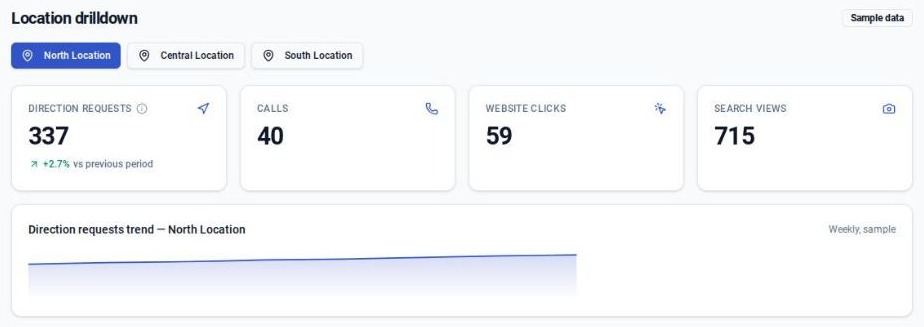
Working today
What you get.
Every location in one view
Calls, direction requests, website clicks, and Search and Maps views for each location, with the daily history behind every number.
Nightly sync from Google
The dashboard refreshes from Google every night. Nobody exports spreadsheets or takes screenshots.
Monthly reports
A report for each location and for the whole portfolio, on screen and as a PDF, with a draft email to go with it.
Review monitoring and replies
New reviews show up across every location. We draft the replies, and they post only after you approve them.
Photo and post tracking
Photo and Google post activity for each location, measured against a monthly target.
Access by role
Regional managers see only their locations. Leadership can get view-only access.
Privacy
Google Business Profile data only.
No patient information
GBP Stats reads the public-facing numbers Google keeps for each business profile: calls, direction requests, clicks, views, reviews, photos and posts. It does not connect to patient records or admissions systems.
People approve what goes public
Review replies are drafted for you and held. Nothing posts to a profile until a person approves it.
Product tour
What you see when you log in.
Six screens from the demo workspace. Every number is sample data.
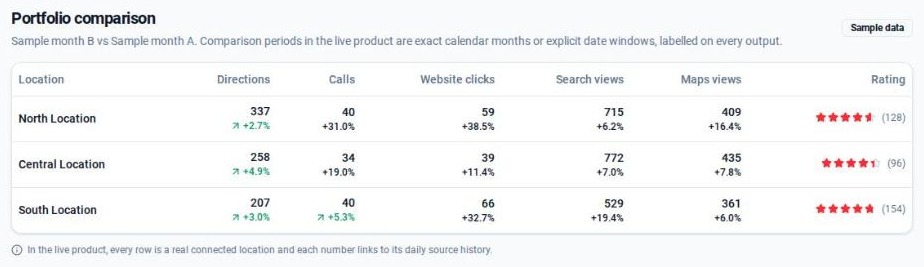
Portfolio comparison
Every location side by side over the same period: direction requests, calls, website clicks, Search views, Maps views and rating. A weak location stands out right away.
Sample dataGetting started
Three steps to your first report.
A 10-minute demo
We walk you through the dashboard with sample data. Tell us how many locations you have and who manages the profiles today.
A review of your locations
We spend about 20 minutes looking at your profiles with you and agree what the rollout covers.
Connect Google once
You connect your Google account one time. We check that every location is syncing before the first report, and the nightly sync runs from there.
See all your locations in one view.
Book a 10-minute demo with sample data.